



About This Program
EaseUS Partition Master v19.5.0 Build 20250110 is a powerful and user-friendly disk management software designed to help users organize, resize, and optimize their hard drives efficiently. Whether you are a home user or IT professional, this tool provides all-in-one disk partitioning solutions for Windows PCs and servers. With its latest build, the software brings faster performance, improved SSD optimization, and better compatibility with Windows 11 and the newest storage devices.
This latest version offers seamless disk cloning, system migration, and partition recovery with just a few clicks. It allows users to move OS to SSD/HDD without reinstalling Windows, merge partitions to increase space, or convert disk types like MBR to GPT safely. The improved user interface makes disk management more intuitive and accessible, even for non-technical users.
EaseUS Partition Master v19.5.0 is ideal for system upgrades, space reallocation, and data protection. It combines advanced partition management with disk health monitoring to ensure your system runs smoothly and efficiently. From optimizing storage performance to preventing data loss, it stands out as a complete disk utility for personal and professional use.
Key Features
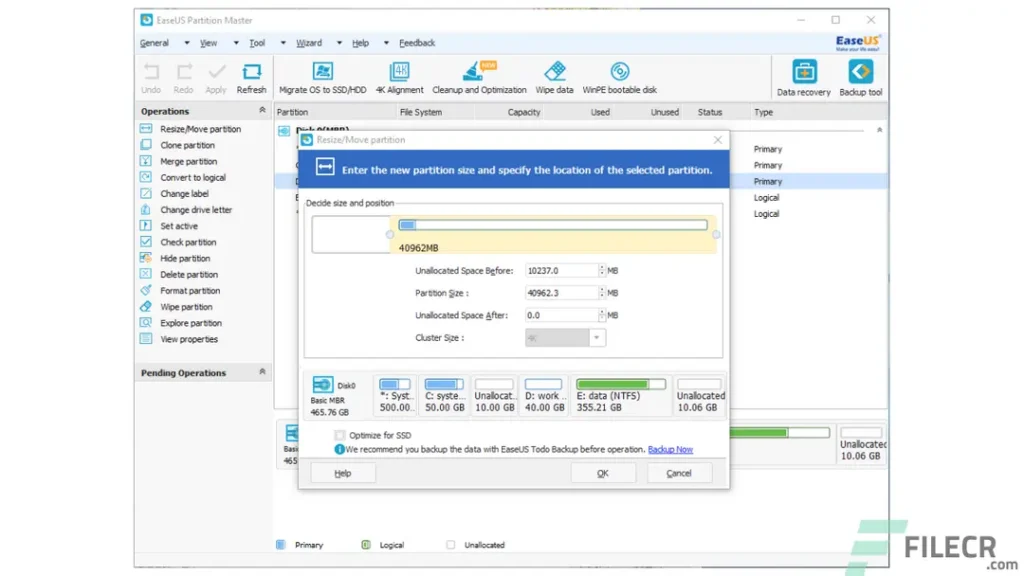
- Resize, move, merge, split, and format partitions without data loss
- Migrate OS to SSD/HDD for faster boot and performance
- Convert MBR to GPT or vice versa without deleting partitions
- Disk cloning and partition copying for data backup and system transfer
- Recover deleted or lost partitions easily
- Check and repair bad sectors on hard drives
- Create WinPE bootable media for emergency system recovery
- Support for large hard drives, SSDs, and dynamic disks
- Clean and optimize disks for better storage performance
- Full compatibility with Windows 11, 10, 8.1, 8, and 7
Screenshots
System Requirements
- Operating System: Windows 11 / 10 / 8.1 / 8 / 7 (all editions)
- Processor: 1 GHz or faster (x86/x64)
- Memory: Minimum 1 GB RAM (2 GB or more recommended)
- Hard Disk Space: 500 MB free space for installation
- Display: 1024×768 resolution or higher
- File System Support: FAT16, FAT32, NTFS, EXT2, EXT3
FAQs
Q1: Can I move my operating system to a new SSD using EaseUS Partition Master?
Yes, the software includes an “OS Migration” feature that allows you to transfer your Windows system to a new SSD or HDD without reinstalling everything.
Q2: Will resizing a partition delete my data?
No, EaseUS Partition Master can resize and move partitions safely without erasing any existing data. However, a backup is always recommended.
Q3: Does it support converting disks between MBR and GPT formats?
Yes, it can convert disks between MBR and GPT without data loss, which is helpful when upgrading to larger drives or UEFI-based systems.
Q4: Can it clone an entire hard drive?
Yes, it offers full disk and partition cloning features for backup and migration purposes.
Q5: Is EaseUS Partition Master free?
It offers both free and paid versions. The paid version includes advanced tools like OS migration, partition recovery, and disk cloning.
Summary
EaseUS Partition Master v19.5.0 Build 20250110 is a comprehensive disk management and partitioning software ideal for optimizing, resizing, and protecting your system drives. It’s perfect for users upgrading to SSDs, managing multiple disks, or recovering lost partitions. The software’s intuitive design, robust feature set, and strong data protection make it one of the best choices for maintaining healthy storage systems on Windows.
EaseUS Partition Master v19.5.0 Build 20250110 Free Download
Direct Download Link Size: 147 MB
Password:www.4download.net

0 Comments