



About This Program
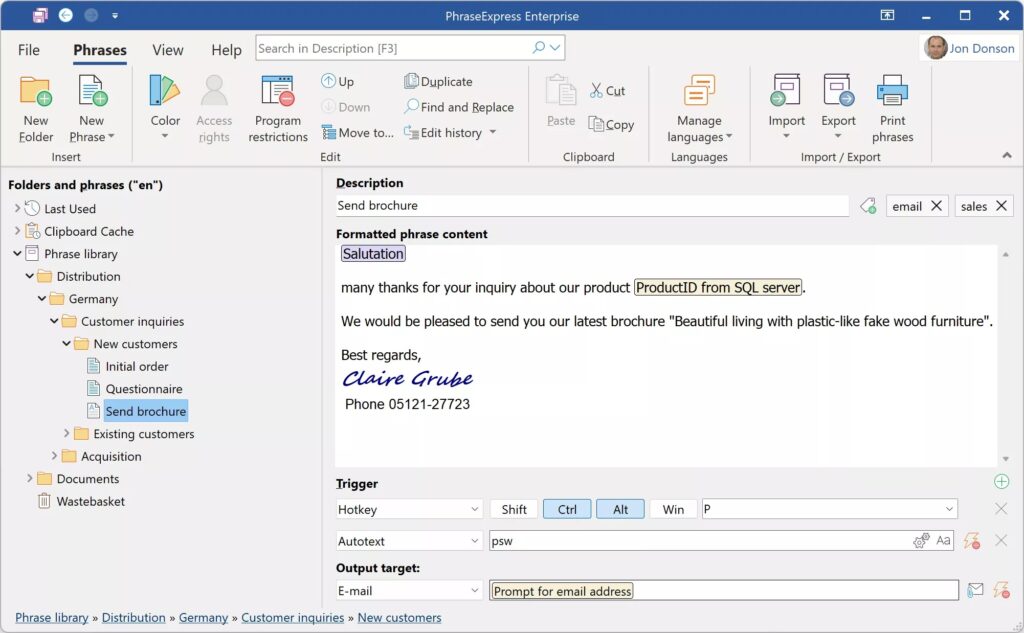
PhraseExpress v17.0.113 Free is a powerful text automation and productivity software designed to simplify repetitive typing tasks and improve workflow efficiency. It allows users to create custom text snippets, phrases, templates, and macros that can be inserted anywhere with a simple keystroke or shortcut. This helps professionals, writers, and office workers save time, reduce typing errors, and maintain consistent communication across emails and documents.
Unlike simple clipboard tools, PhraseExpress offers smart text expansion, customizable hotkeys, and advanced automation options. It can automatically complete phrases, correct common typos, and even insert dynamic data such as dates or clipboard content. Whether you’re managing customer support responses, writing reports, or coding, PhraseExpress adapts perfectly to your needs.
The software also supports cloud synchronization, multi-user collaboration, and a portable version for USB use. Its clean interface and flexible configuration make it suitable for individuals, teams, and businesses seeking a fast and reliable text automation solution without complex setup or coding knowledge.
Key Features
- Text expansion for commonly used words and phrases
- Auto-correction of typos and misspelled words
- Smart macros to automate repetitive actions
- Clipboard manager with history tracking
- Dynamic fields (date, time, clipboard, etc.)
- Customizable hotkeys and shortcuts
- Cloud synchronization and sharing options
- Multi-user support for teams and organizations
- Portable version for USB drive use
- Supports Windows, macOS, and iOS platforms
Screenshots
System Requirements
- OS: Windows 10, 11 or later / macOS / iOS
- CPU: Dual-Core Processor or higher
- Memory: 2 GB RAM minimum
- Storage: 200 MB of available disk space
- Internet: Required for cloud synchronization (optional)
- Display: 1024×768 resolution or higher
Frequently Asked Questions (FAQs)
Q1: Is PhraseExpress v17.0.113 free to use?
Yes, the free version is available for personal use. Business users may need a commercial license.
Q2: Can I sync my snippets across devices?
Yes, you can sync snippets using cloud services such as Google Drive or Dropbox.
Q3: Does it work offline?
Yes, PhraseExpress works fully offline once installed. Only synchronization features require the internet.
Q4: Can I use PhraseExpress on macOS or iPhone?
Yes, PhraseExpress supports Windows, macOS, and iOS platforms with cross-device syncing.
Q5: Does PhraseExpress store my data securely?
All snippets are stored locally or on your chosen cloud service; no data is sent to external servers.
Summary
PhraseExpress v17.0.113 Free is an advanced text automation tool that eliminates repetitive typing and enhances productivity. With powerful text expansion, typo correction, macro automation, and cloud synchronization, it’s ideal for individuals and teams alike. Lightweight yet highly functional, it’s a must-have utility for anyone seeking faster, smarter typing and workflow automation.
PhraseExpress v17.0.113 Free Download for Windows
Direct Download Link Size: 47.3 MB
Password:www.4download.net

0 Comments