Android Studio 2025.1.1.14 Free Download for Windows


About This Program
Android Studio 2025.1.1.14 is the official integrated development environment (IDE) for Android app development, built and maintained by Google. This latest version offers an enhanced interface, improved stability, and advanced AI-powered coding tools to streamline the app creation process. With built-in support for Kotlin, Java, and C++, developers can efficiently design, build, and test high-quality Android apps across different devices and form factors.
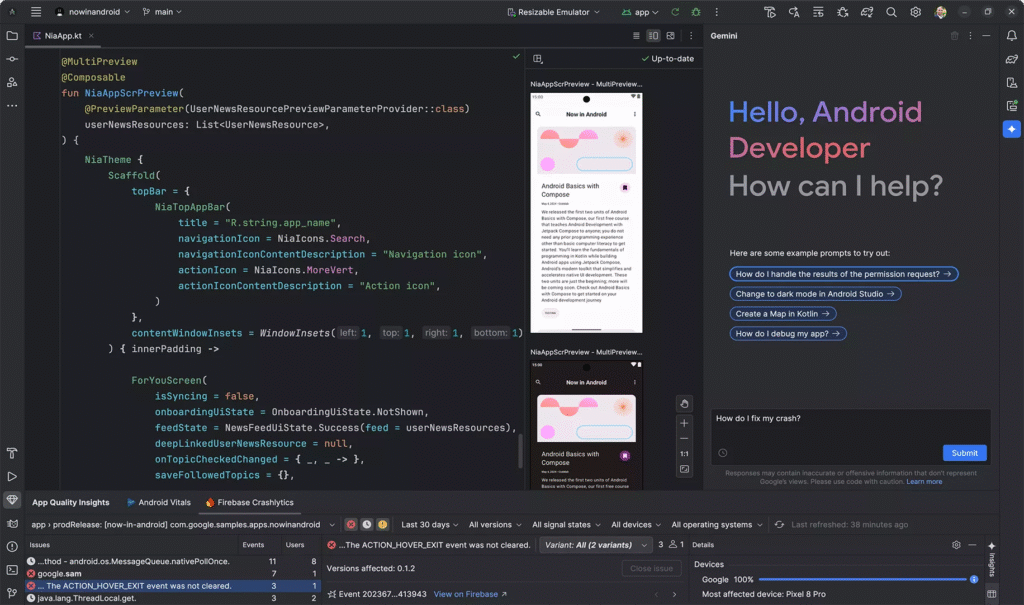
In Android Studio 2025, Google has focused on performance optimization, faster Gradle builds, and smarter code suggestions. The IDE now provides seamless integration with Jetpack Compose, the modern UI toolkit for building native Android interfaces with less code and higher speed. Additionally, it supports real-time previews, emulator enhancements, and better compatibility with the latest Android SDKs, ensuring a smoother development workflow for professionals and beginners alike.
Android Studio 2025.1.1.14 also emphasizes cloud synchronization and AI-assisted development. Developers can now benefit from intelligent code completion, automated refactoring, and live debugging tools powered by Google’s AI models. Combined with advanced profiling features and compatibility with the latest Android 15 APIs, this release makes app development more productive, secure, and efficient than ever before.
Key Features
- Enhanced AI-powered code completion and bug detection
- Faster Gradle build performance and caching
- Seamless Jetpack Compose integration with live previews
- Improved Android Emulator with multi-device testing
- Built-in Git and version control system
- Real-time app profiling and performance analysis tools
- Kotlin, Java, and C++ language support
- Smart layout editor with drag-and-drop interface
- Cloud synchronization and backup support
- Support for Android 15 SDK and latest API levels
Screenshot
System Requirements (Windows)
- Operating System: Windows 10 or Windows 11 (64-bit)
- Processor: Intel Core i5 / AMD Ryzen 5 or higher
- Memory (RAM): 8 GB minimum (16 GB recommended)
- Storage: 10 GB free disk space for IDE + SDK installation
- Graphics: DirectX 11 compatible GPU
- Screen Resolution: 1280×800 minimum
- Java Development Kit (JDK): Built-in JDK included
Frequently Asked Questions (FAQs)
Q1: Is Android Studio 2025.1.1.14 free to use?
Yes, Android Studio is completely free and open-source for all developers.
Q2: Can I develop iOS apps with Android Studio?
No, Android Studio is specifically designed for Android app development, but you can use cross-platform frameworks like Flutter within it.
Q3: Does Android Studio 2025 require an internet connection?
An internet connection is needed for initial setup, SDK downloads, and updates, but you can work offline afterward.
Q4: Is Kotlin better than Java for Android development?
Yes, Kotlin is officially recommended by Google because it offers concise syntax and improved safety over Java.
Q5: Can I import my older Android Studio projects?
Absolutely. Android Studio 2025 supports backward compatibility and will automatically update older projects when opened.
Summary
Android Studio 2025.1.1.14 for Windows is a powerful and modern IDE that revolutionizes Android app creation with AI-powered tools, faster performance, and complete support for the latest Android APIs. It’s built to offer developers an efficient environment with real-time debugging, advanced UI design tools, and optimized build systems. Whether you’re a beginner or a professional developer, this version ensures a smoother and smarter Android development experience.
Android Studio 2025.1.1.14 Free Download for Windows
Direct Download Link Size: 1.37 GB