Classroom Spy Pro v5.4.7 Full version

About This Program
Classroom Spy Pro is a powerful yet easy-to-use classroom management tool that enhances the way you oversee student activity. It allows you to monitor what students are doing on their computers—all without leaving your seat.
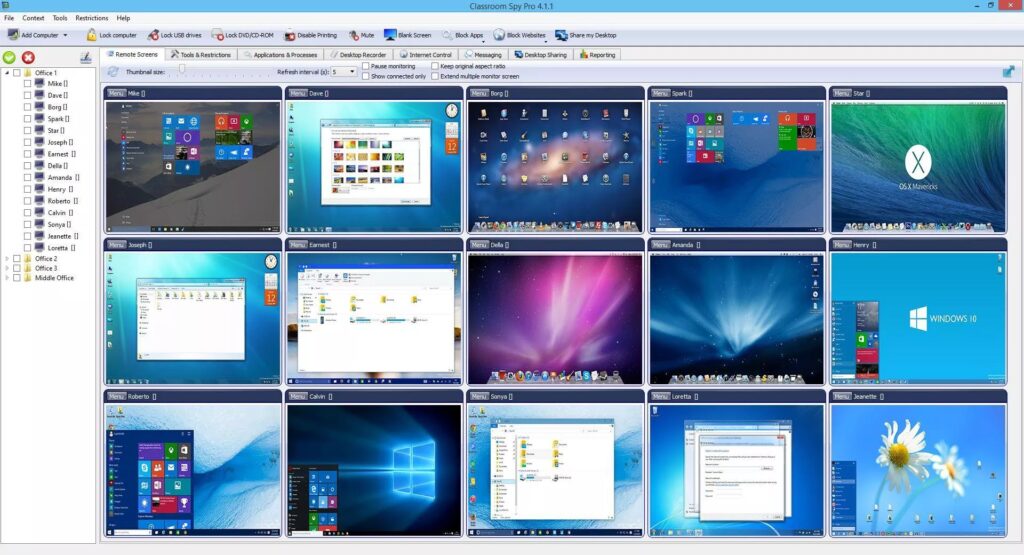
With this software, you can remotely view every student’s screen, share your own screen with the class, record their actions, take control of their devices, deliver live demonstrations, restrict internet access, block specific applications, and much more.
🎬 Review
Features:
- Displaying a live picture of a remote computer.
- You can take control of a remote computer by controlling its mouse and keyboard.
- More remote screens can be displayed in a table.
- Computers can be organized in computer groups (e.g., classrooms)
- A remote screen can be zoomed to an actual size.
- The name of the connected user is displayed.
- Record remote computer screens to MPG4 files.
- Show your desktop to students or show student desktop to students
- Power on/off, restart, hibernate, and suspend remote computers
- Log off desktop users
- Lock workstation
- Clear Desktop
- Control screen-saver
- Block Internet
- Block applications
- Mute remote computers
- Limit remote computers’ audio volume level
- Disable printing
- Disable Ctr+Alt+Del
- Blank screen
- Start the program on remote computers and see the output.
- Open the web page on remote computers.
- Multi-monitor support
- Control over running processes and applications
- You can lock selected remote computers
System Requirements
- Supported OS: Windows 11, Windows 10, Windows 8.1
- RAM (Memory): 2 GB RAM (4 GB recommended)
- Free Hard Disk Space: 200 MB or more
Classroom Spy Pro Free Download
Direct Download Link Size: 59 MB
Pass: www.4download.net