Minimal Audio Lucid v1.0.0 for Windows

About Minimal Audio Lucid
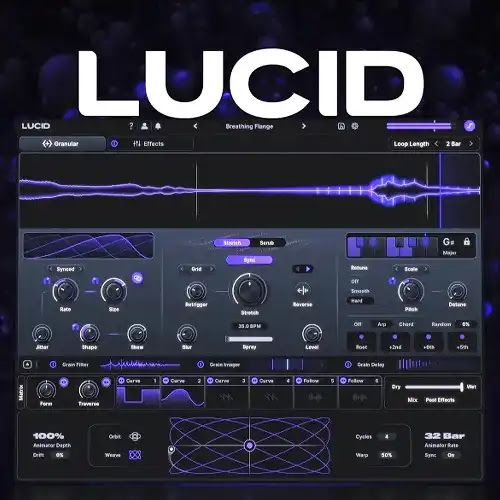
Lucid is Minimal Audio’s newest plugin, and it’s not a synth despite what “Minimal Audio” and “granular” might make you assume. It’s an insert effect. Audio flows through it in real time, gets chopped into tiny fragments called grains, and comes back out rearranged, stretched, or re-pitched into something new. Minimal Audio’s already known for Current and Rift, both flagship synths, so Lucid marks a shift into processing existing audio instead of generating it from scratch.
It’s built for anyone who wants granular sound design without the usual problem granular tools have: staying musical. Producers dropping it on vocals, guitars, synths, or drums for tuned harmonies and rhythmic textures. Sound designers building ambient beds or abstract textures that still sit in key. Anyone who’s tried an older granular plugin, gotten something interesting but completely out of tune with the rest of the track, and given up on the idea.
The core is a real-time granular engine with 2 playback modes: Stretch, which time-stretches and freezes captured audio synced to your DAW’s tempo, and Scrub, which lets you move freely through captured audio and automate the playback position. What sets Lucid apart is Grain Scale-Lock, which detects each grain’s pitch and retunes it to your chosen key in real time, so transposing and modulating stays musical instead of dissonant. Timeline Sync keeps everything, stretching, freezing, scrubbing, locked to your session grid rather than drifting independently.
Beyond the granular engine, Lucid adds 3 per-grain shapers: a multimode grain filter (low-pass, high-pass, morph, comb, phaser, allpass, and more, each with drive and modulation), a dynamic grain imager for pulling stereo movement directly out of the grains across 6 modes, and a harmonic grain delay for scale-locked shimmer and arpeggiated space. A shared modulation engine, familiar if you’ve used Current or Rift, brings 6 swappable modulators, 2 macro knobs per preset, and an Animator XY pad for controlling multiple parameters at once. An 8-effect rack across 12 slots rounds it out: delay, reverb, chorus, compression, distortion, EQ, filter, and frequency shifting, all chainable and reorderable.
Key Features (Latest Version)
- Real-Time Granular Engine: Rebuilds incoming audio grain by grain, in Stretch or Scrub mode.
- Grain Scale-Lock: Detects and retunes every grain’s pitch to your chosen key automatically.
- Granular Timeline Sync: Locks stretching, freezing, and scrubbing to your session’s grid.
- Multimode Grain Filter: Low-pass, high-pass, morph, comb, phaser, allpass, and more, with drive.
- Dynamic Grain Imager: 6 modes for pulling stereo width and depth directly from the grains.
- Harmonic Grain Delay: Scale-locked multi-tap delay for shimmer and arpeggiated spaces.
- Shared Modulation Engine: 6 swappable modulators, macros, and a full modulation matrix.
- Animator XY Pad: Control multiple modulation parameters from one animated surface.
- 8-Effect Rack: Delay, reverb, chorus, compression, distortion, EQ, filter, and shifter across 12 slots.
- 350+ Presets: Organized across 13 packs, searchable by tag, each with 2 macro controls.
Minimal Audio Lucid v1.0.0 Screenshots

System Requirements (Windows)
- Operating System: Windows 10 / Windows 11 (64-bit)
- Processor: Intel Core i5 or AMD Ryzen 5 equivalent
- Memory: 8 GB RAM recommended
- Storage: Sufficient free disk space for the plugin and associated content
- Plugin Format: VST3
- DAW: Compatible VST3 host application
- Audio: ASIO-compatible audio interface recommended
How to Install Minimal Audio Lucid v1.0.0
- Download the Windows installation package.
- Extract the archive using WinRAR or 7-Zip if required.
- Run the installer.
- Select the required plugin installation location.
- Complete the installation process.
- Launch your preferred DAW.
- Perform a VST3 plugin scan if Lucid is not detected automatically.
- Load Minimal Audio Lucid on an instrument track.
- Browse the available sounds and begin creating your production.
Note: If Lucid does not appear in your DAW, verify that the VST3 component was installed correctly and perform a manual plugin rescan.
Related Software You May Like
- Analog Realism Sphinx 101 v1.3.2 for MacOS
- REAPER v7.75 for Windows
- Overloud TH-U v2.0.16 for Windows
Summary
Minimal Audio Lucid v1.0.0 for Windows is a modern software instrument for creating basses, leads, pads, plucks, keys, and atmospheric electronic sounds in compatible DAWs.